
Windsurf AI Review 2026: Is It the Best Coding Assistant
Discover what Windsurf AI is, its coding assistant features, pricing plans, and developer use cases. Enter Pro unlocks powerful AI capabilities, making Windsurf a top alternative to Cursor for modern developers and teams building faster applications
In 2026, the transition from basic autocomplete to fully agentic development is fundamentally altering the software lifecycle, moving developers from line-by-line creation to high-level system orchestration. Windsurf is a primary driver of this shift, offering an integrated environment where the AI doesn't just suggest, it also executes, refactors, and manages complex projects with deep contextual awareness. This guide dives into Windsurf's specialized architecture and pricing tiers. Within minutes, you will attain a clear perspective on this new trendsetter.
What is Windsurf AI, and how does it work
Windsurf AI is a code editor designed to harness the capabilities of AI technology in order to revolutionize the way software developers code, review their code, and optimize it. As an intelligent agent that operates within the integrated development environment, Windsurf uses Cascade—a highly advanced agentic technology—to provide instantaneous advice.
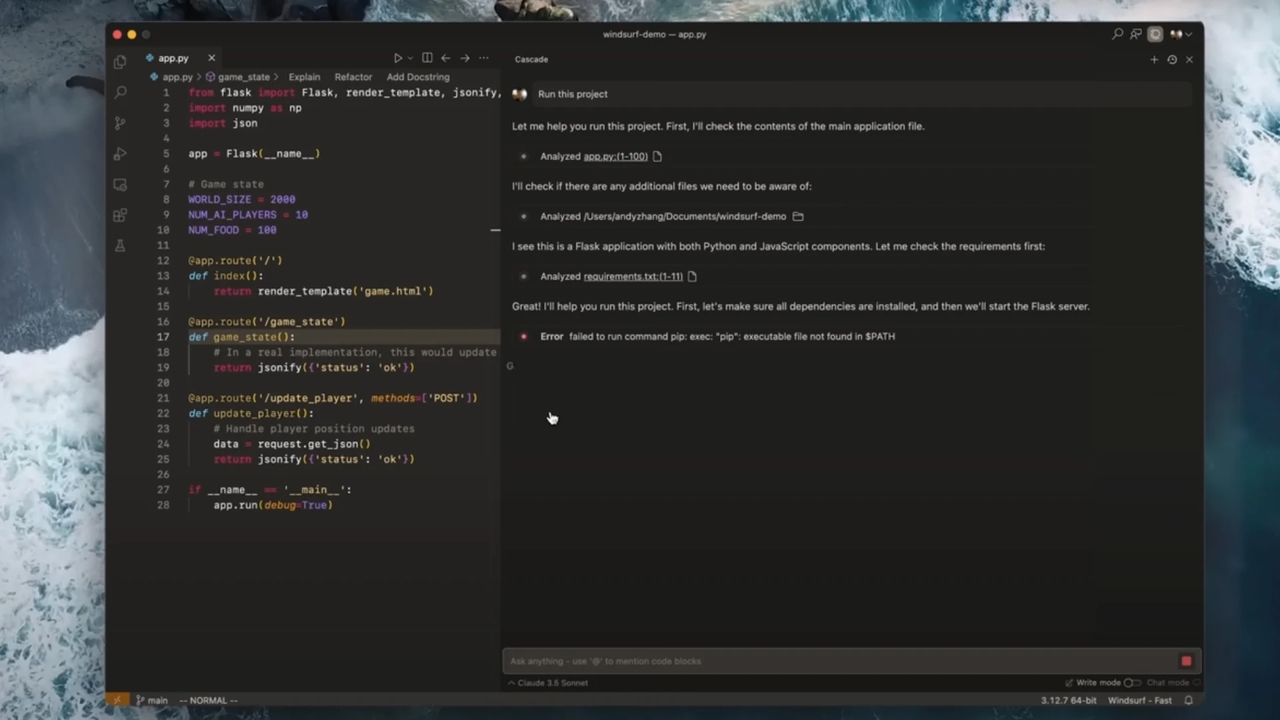
Key features of the Windsurf AI code editor
- Smart Code Autocompletion & Suggestions from AI: It gives real-time autocompletion by suggesting the following lines of code according to the context provided by you. This feature saves a lot of time when writing code while reducing syntax errors and redundant typing.
- Code Suggestions According to the Project Structure: It automatically understands the current project structure and makes appropriate code suggestions. Thus, it guarantees that the code will be logically written in full accordance with the application's current framework.
- Multilingual Coding & Automatic Function Creation: The Windsurf AI code editor is compatible with all code frameworks and programming languages; moreover, it automates coding tasks, including the creation of functions.
- Code Generation & Refactoring: In addition to automatically generating code in response to a user prompt, the AI code editor supports refactoring existing code.
- Error Detection and Fixing: The Windsurf AI automatically finds errors in your code and gives suggestions on their elimination.
Windsurf pricing and plan comparison breakdown
Plans Overview
| Feature | Free | Pro | Max | Teams | Enterprise |
| Price | $0 | $20/month | $200/month | $40/user/month | Contact Sales |
| Usage Quota | Light quota | Increased quotas | Significantly higher quotas | Standard (same as Pro) | Highest priority |
| Model Access | Limited models | Full access (OpenAI, Claude, Gemini) | Full access | Full access | Full access |
| Key Features | Unlimited Inline edits & Tab completions | Everything in Free + SWE-1.5 model access | Everything in Pro + Heavy usage limits | Everything in Pro + Centralized billing | Everything in Teams + Dedicated management |
| Admin Tools | No | No | No | Admin dashboard & analytics | SSO, RBAC & Hybrid deployment |
| Support | Standard | Standard | Standard | Priority Support | Dedicated Account Manager |
Value for developers and teams:
For developers, Windsurf AI provides good value by speeding up coding tasks like debugging, refactoring, and feature development. The free plan is useful for learning, but quickly becomes limited for regular use. Pro plans are better for consistent development work with improved speed and AI accuracy. Teams benefit from collaboration tools, shared usage, and better workflow management across projects.

Is Windsurf pricing worth it?
Generally speaking, the pricing for Windsurf's Pro plan is well worth it at $20 per month, as its performance meets top expectations and consistently adheres to the fixed daily/weekly limits provided for Cascade agentic systems and the dedicated SWE-1.5 models. The $20 price tag is a smart starting point in 2026 for competing with other services, such as Cursor, while providing better support for IDEs and project indexing.
Windsurf AI coding assistant use cases in real development
Workflows for startup and indie developers
The Windsurf AI coding assistant enables small firms to build their products quickly through artificial intelligence-based development solutions. Thanks to this coding solution, creating a minimum viable product becomes faster. Using the Windsurf AI coding assistant, developers will be able to solve repetitive tasks fast.
Enterprise-level software engineering
Thanks to the context-aware capabilities of the Windsurf AI coding solution, it will be easier to manage large, complex projects with many files. The Windsurf coding assistant will be able to maintain coding standards in an enterprise-scale project thanks to its ability to recognize the context.
Debugging and troubleshooting
By using this AI coding assistant, developers will have access to automatic bug and error detection services. The tool will provide smart fixes for bugs found in real time. Using the solution, developers will be able to reduce debugging efforts and resolve any issues much faster.
Workflow automation and productivity boost
Windsurf AI is capable of performing repetitive tasks, such as generating boilerplate code and managing routine code changes. This allows engineers to save time on mundane tasks and focus on logic and architecture.

Windsurf AI user experience: pros, cons, and feedback summary
Strengths of the Windsurf AI code editor:
Windsurf AI code editor provides fast, smooth AI-assisted coding with strong autocomplete and context-aware suggestions. It helps reduce repetitive coding and improves daily development speed. Many users of Windsurf AI code editors highlight its simplicity and strong automation features. It is especially effective for rapid development and prototyping workflows.
Limitations and pricing concerns
Windsurf can face limitations with large, complex enterprise-level codebases. Some users find Windsurf pricing less cost-effective for heavy or long-term usage. Advanced features are often restricted to paid plans, limiting free-tier capabilities. Occasional inconsistencies in the accuracy of deep debugging are also reported.
Real user feedback insights
Developers using Windsurf AI coding assistant often praise its speed, ease of use, and productivity gains. It is widely valued for automating repetitive tasks and accelerating development cycles. However, feedback suggests it is more suitable for startups and indie developers than strict enterprise environments. Overall, it is seen as a strong productivity tool with some scalability limits.
New alternative: Why Enter Pro is an upgrade for Windsurf AI users
Although Windsurf has become popular because of its agentic "Cascade" engine, there is a need for an alternative, especially one that gives developers more control and depth when integrating their projects.
What makes Enter Pro stand out from the crowd is its departure from the IDE-assistant architecture and its focus on using JSON to reason while also having an enhanced training set. Let's dive deeper and check out where Enter Pro prevails over Windsurf in terms of reasoning power and structured outputs.
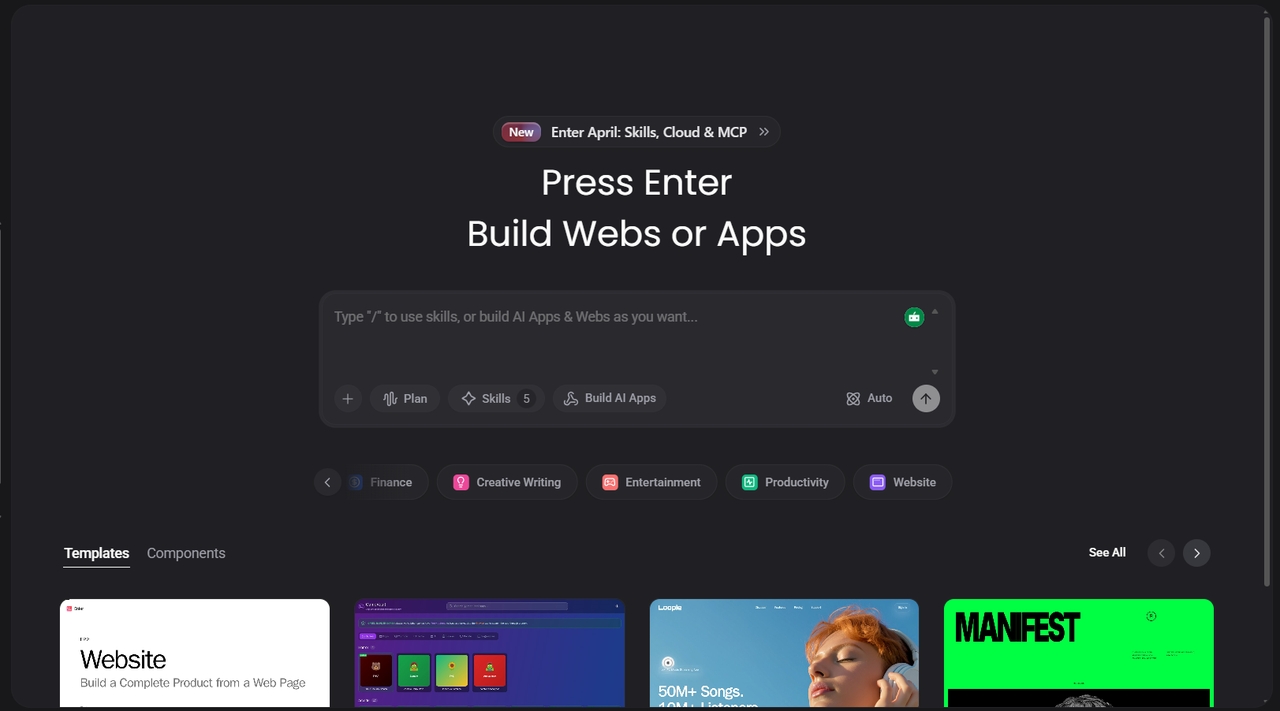
Key features:
- Advanced AI coding capabilities: Generates highly accurate, structured, and production-ready code for complex development tasks
- Deep context awareness across projects: Understands entire codebases, multiple files, and dependencies to provide more relevant and consistent suggestions across the project.
- Faster AI response and code generation: Reduces wait times through optimized processing, enabling quicker real-time coding and smoother development workflows.
- Enhanced automation workflows: Automate repetitive tasks such as refactoring, boilerplate creation, and updates, helping developers focus on core logic.
- Smarter debugging and error fixing: Detects issues faster with better context analysis and provides more reliable and precise fixes for complex bugs.
- Multi-step task execution: Breaks complex development tasks into structured steps and executes them consistently for better accuracy and control.
Final verdict
Windsurf AI delivers strong performance with fast, AI-powered coding, useful automation, and improved developer productivity, making it ideal for modern workflows. However, Enter Pro enhances these capabilities with deeper context awareness, faster responses, and more advanced automation features. Developers should choose Enter Pro over standard Windsurf AI for complex projects and professional use. Overall, Windsurf AI is great for general development, while Enter Pro is recommended for serious developers and teams seeking maximum efficiency.
FAQ's
Is Windsurf AI coding assistant better than Cursor for coding in 2026?
Windsurf AI coding assistant is better for speed, automation, and rapid development workflows. The cursor is stronger for precision, large-scale projects, and structured coding. According to 2026 comparisons, Cursor often leads in accuracy, while Windsurf excels in fast iteration and agent-based workflows.
Is Enter Pro better than the free and standard Windsurf plans?
Yes, Enter Pro offers improved performance compared to the free and standard Windsurf AI plans. It provides deeper context understanding, faster responses, and more advanced automation features. This makes it more suitable for professional developers working on complex projects and in continuous development workflows.
How does Windsurf AI coding editor handle large codebases and projects?
Windsurf AI coding editor uses agent-based context tracking to understand project structure and dependencies. It performs well on medium- to large-scale projects but may face limitations with extremely large monorepos. In such cases, performance depends on how well the codebase is indexed and structured.
How does Enter Pro improve coding speed and accuracy?
Enter Pro improves coding speed by optimizing AI responses and reducing generation time. It also increases accuracy by using deeper project context and multi-step reasoning for complex tasks. This leads to fewer errors and more reliable production-ready code output.
How accurate is Windsurf AI for coding and debugging tasks?
Windsurf AI is generally accurate for everyday coding, autocomplete, and standard debugging tasks. However, for complex multi-file debugging, accuracy can vary depending on project size and context clarity. Overall, it performs well for most development workflows but may require manual review in advanced cases.