Enterprise Software Development: Future-Proof Your Business
Transform your enterprise with cutting-edge software solutions built for efficiency and agility. Explore the step-by-step guide to using Enter Pro for enterprise software development to improve workflow and boost productivity.
Many growing businesses struggle with disconnected systems, inefficient workflows, data silos, and tools that simply don’t scale. Then the business grows, and those minor gaps turn into delays, rising costs, and missed opportunities. It adds friction. Quietly at first, then all at once. That’s where enterprise software development starts to make sense. Not as a trend, but as a practical response to growing complexity. You begin building systems that reflect how your business actually operates. Tools like Enter Pro can speed up development while streamlining development, reducing complexity, and creating future-ready software that evolves with their business. This guide walks you through the fundamentals, the enterprise software development process, and a few realities you’ll likely encounter along the way.
What is enterprise web software development
Enterprise web software development is about building applications for organizations, not individuals. You’re dealing with scale here—large operations, heavy data loads, and multiple processes all running at once. It’s not just one workflow. It’s many, all connected, all expected to work together.
Enterprise software is built for complex tasks. You have several users logging in from different departments, each with their own priorities. This software puts different parts of your business into one environment so information flows more freely between teams. ERPs, CRMs, and SCM platforms - they all play a role in this structure. As everything falls into place, communication is better and decisions are made faster.
Why enterprise software is required for modern business
Scalability of resources as business grows
Growth is exciting. And then the pressure. Enterprise software is a base that grows with you, so you don’t have to rebuild everything every time demand increases. Features can be added, capacity can be expanded, and things keep moving without regular resets.
Automation of repetitive tasks
Data entry, reports, approvals – it’s required, but not every time it takes your full attention. That layer is taken care of by automation. Your team has room to focus on decisions, planning, and work that actually needs thinking. Things move faster, and there is more consistency from task to task.
Improved productivity and collaboration
If the teams are in different systems it’s harder to coordinate. Information is often delayed, duplicated or out of sync. Enterprise software allows teams to collaborate on a shared platform with real-time data access. And collaboration is better because everyone has the same information.
Enhances customer experience through data-driven insights
To truly know your customers, you need accurate and complete information. Enterprise software collects data from multiple touchpoints and puts it in one place for better visibility. With this data, you can see trends, know what customers want, and serve them better.
Reduces operational costs and inefficiencies
Disconnected systems cost more than they should. When your systems are aligned, those inefficiencies start to fade. Workflows make more sense, and resources get used better. You spend less time fixing things that shouldn’t have gone wrong in the first place.
Reduces operational costs and inefficiencies
Common culprits for operational inefficiencies are disconnected systems, duplicated work, and unclear workflows. These problems can increase costs and reduce productivity. Enterprise software addresses this by integrating systems and structuring workflows more systematically. Processes become more efficient, resources are used more effectively, and unnecessary work is reduced.
Key types of enterprise software
- Enterprise Resource Planning (ERP)
ERP systems combine core business processes such as finance, procurement, inventory, and operations into a single platform. This integration provides a consolidated view of the organization, simplifying resource management, performance tracking, and planning. ERP helps businesses coordinate better between departments, cut down on duplicated work, and keep data consistent.
- Customer Relationship Management (CRM)
CRM systems focus on how you interact with customers—sales, marketing, communication, all of it. You can track leads, follow customer behavior, and manage conversations. Everything sits in one place, so your team isn’t guessing what happened in the last interaction.
- Business Intelligence (BI)
BI tools analyze business data and present it in a way to make informed decisions. They shed light on performance metrics, trends, and opportunities. BI systems enable businesses to monitor key indicators, identify patterns, and make strategic decisions based on data, rather than assumptions.
- Supply Chain Management (SCM)
SCM systems facilitate the movement of goods, information, and resources along the supply chain. They assist with supplier coordination, shipment tracking, and logistics optimization. These systems provide better visibility over the supply chain, resulting in better planning and less delay.
- Human Resource Management (HRM)
HRM software manages employee-related processes, including recruitment, payroll, performance management, and training. It aggregates employee data and removes administrative tasks. This helps organizations manage their workforce more effectively, increase employee engagement, and stay compliant with regulations.
The stages involved in custom enterprise software development

Requirement analysis and business goals
Before you write a single line of code, you need to understand how your business actually works—where the gaps are, what’s slowing things down, and what you expect the software to fix. You define objectives, outline expectations, and set direction for everything that follows. This stage shapes the entire project more than most people realize.
Strategic planning and architectural design
After the identification of requirements, the system architecture is planned. This includes selecting technologies, defining system elements, and describing how different parts will interact. Well-structured architecture helps scalability and performance. It also makes it easier to adapt and expand the system as business needs change.
Development and integration
This is where the actual building begins in enterprise software application development. Developers create features, implement functionalities, and integrate the software with existing systems. Integration is an important part of this stage, as enterprise software often needs to connect with other tools and platforms already in use.
Testing and quality assurance
Before deployment, the software undergoes thorough testing. This includes checking functionality, performance, and security. Testing ensures that the system works as expected and can handle real-world scenarios. It helps identify and resolve issues before the software is launched.
Deployment and continuous improvement
After testing, the software is deployed for use. Once it is live, the focus shifts to monitoring performance and making improvements. Continuous updates help keep the system aligned with changing business needs. This ensures that the software remains effective and relevant over time.
Challenges in custom software development for enterprise
- Scalability and performance issues
One of the challenges you face in enterprise custom software development is scalability. As your business grows, your software needs to handle more users, more transactions, and larger volumes of data without slowing down. This requires thoughtful architecture from the beginning, so systems that can distribute workloads, manage traffic efficiently, and maintain consistent performance under pressure.
- Integration with legacy systems
Most organizations already use a variety of tools and platforms. Bringing a new enterprise system into that environment means connecting it with existing software in a way that keeps data consistent and processes aligned. This involves working with APIs, data formats, and workflows to ensure everything functions as one connected system.
- Security threats and compliance
Enterprise systems often handle sensitive business and customer data, making security a top priority. This includes implementing strong access controls, encryption, and monitoring systems to protect information. Building security into the development process from the start helps maintain trust and ensures that systems remain reliable and compliant over time.
- Data silos and interoperability challenges
Enterprise software relies heavily on accurate and consistent data. Managing that data across multiple systems requires clear structures, validation processes, and standardized formats. Interoperability ensures that data can move smoothly between different applications without loss or duplication.
- User adoption and training issues
New software onboarding means helping teams move to new workflows and interfaces. Good training programs, intuitive design, and ongoing support are key to making that transition a smooth one. People who know how to use the system will get the best out of it.
Build enterprise software faster with Enter Pro
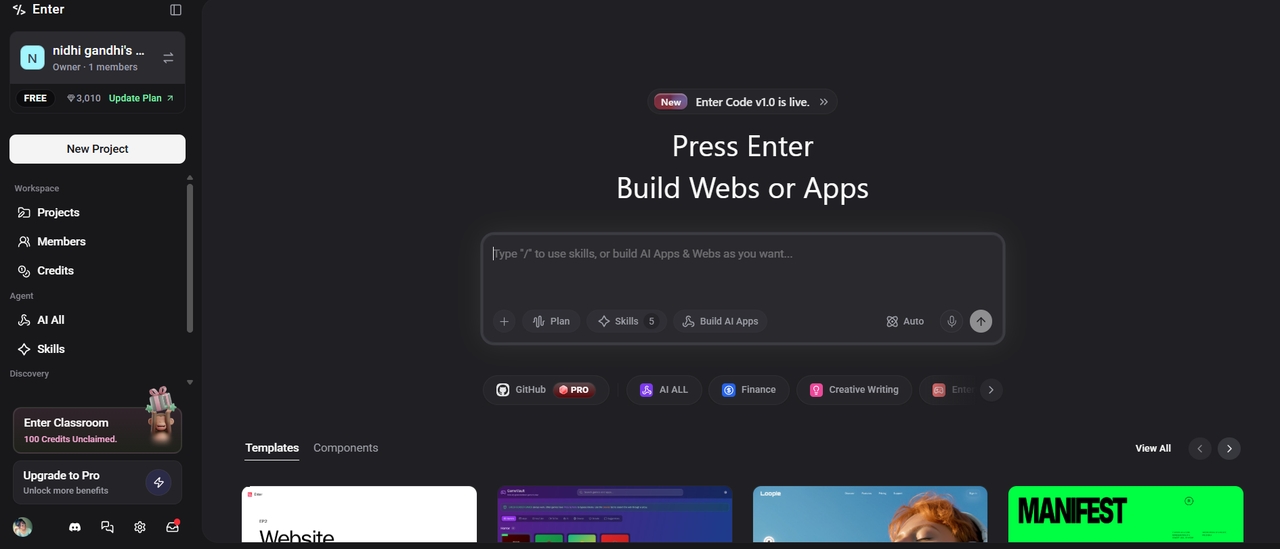
Enter Pro is an AI development agent that helps you make enterprise custom software development faster and more structured. This AI app builder allows teams to move from planning to execution more efficiently, while still being aligned with business goals.
Key benefits
- Automated code generation
One of its key strengths is automated code generation, which reduces development time and helps teams focus on refining features rather than building everything from scratch.
- 100% code ownership
It also provides 100% code ownership, giving businesses full control over their software.
- Scalable architecture suggestions
Another important aspect is its ability to suggest scalable architectures. This helps ensure that the system is built with long-term growth in mind, supporting future expansion without major changes.
Step-by-step guide
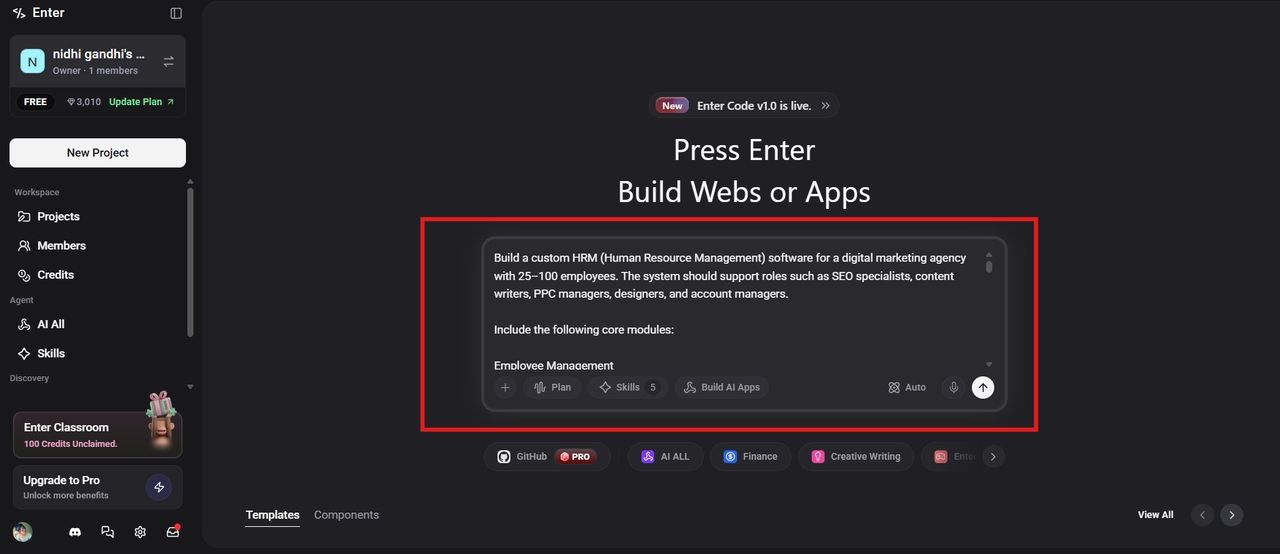
Step 1: Write a descriptive prompt about your software
Launch Enter Pro in your web browser and enter a descriptive prompt about your enterprise software. Mention all elements, like buttons required, color palette, theme, and everything. Select the AI model, and click the Generate button to begin the process.
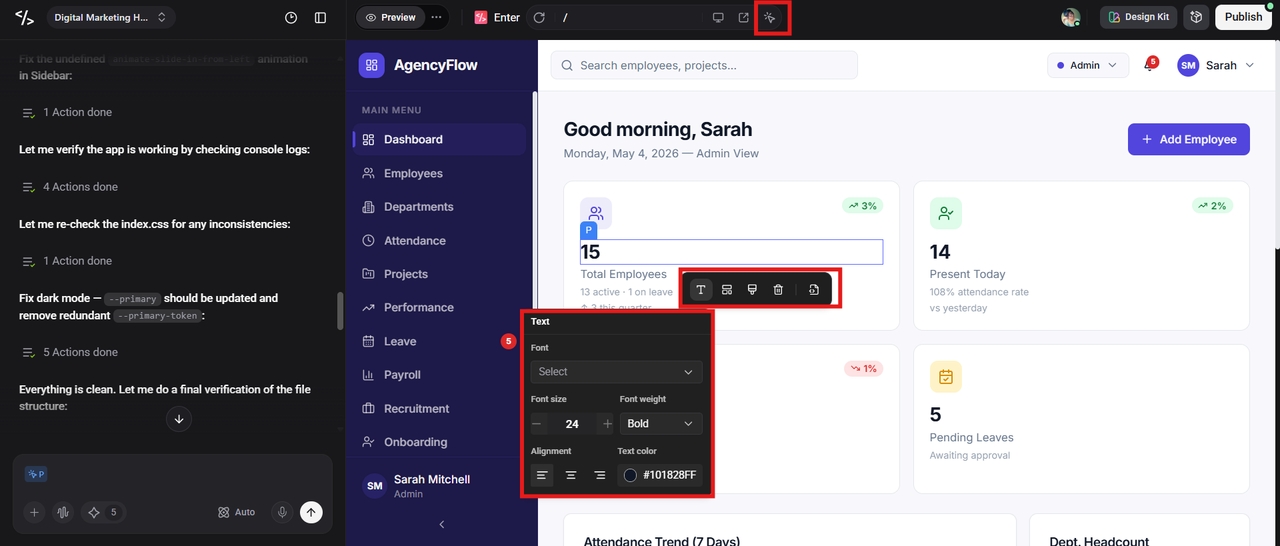
Step 2: Use the Visual Editor to customize
Once the tool creates enterprise software for you, check the backend support and use the Visual Editor to make further customization. You can change the layout, text font and color, and other elements, to make the software look more personalized.
Step 3: Publish the software and go live
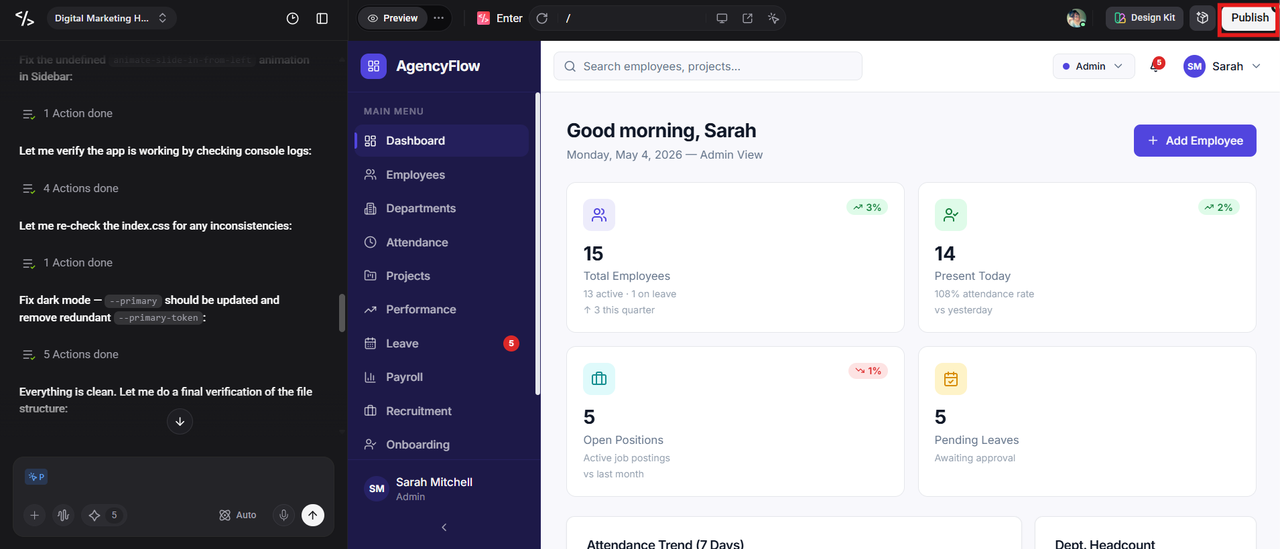
If you are satisfied with the final result, click the "Publish" button at the top to publish your software and go live immediately.
Conclusion
Enterprise software is now an essential part of how businesses operate and grow. It brings structure to complex processes, improves collaboration between teams, and enables better decision-making with connected data.
Organizations build scalability, efficiency, and long-term success on the foundation of enterprise software development. Enter Pro is a solution that brings greater efficiency to the process and allows companies to build systems that are aligned with their objectives and positioned for future growth.
FAQs
What is enterprise software development in simple terms?
Enterprise software development is the process of creating applications that are tailored to meet the unique needs of organizations, allowing them to effectively manage their operations, data, and work processes. It basically helps you to keep everything in one place. Data is easier to follow. Processes are becoming more structured. Teams don’t have to rely on disparate tools to get stuff done.
How is enterprise software different from regular software?
It is a matter of scale and purpose. Enterprise software is designed for organizations, which means it scales for multiple users, departments, and workflows simultaneously. Regular software is usually for individual use or for smaller, specific tasks.
What are examples of enterprise software?
Enterprise software includes systems that support different parts of a business. Some of the most common examples are ERP (Enterprise Resource Planning), CRM (Customer Relationship Management), SCM (Supply Chain Management), BI (Business Intelligence), and HRM (Human Resource Management).
How long does enterprise software development take?
The timeline for enterprise software development depends on several factors, including the complexity of the system, the number of features, and how many integrations are required. However, you can reduce the timeline to just a few minutes with Enter Pro. Provide your requirements, and this AI dev agent gives you the result instantly.
Why is enterprise software important for future growth?
As your business grows, the complexity of your operations increases. More customers, more data, and more processes to manage efficiently. Enterprise software provides an organized structure that makes this growth possible without confusion or inefficiency. It lets you scale operations, automate routine tasks, and make better decisions from accurate data.